4n6 Lab, Part 1
In this writeup, we will investigate a VM image simulating a real-world compromise. This challenge was provided as part of a forensics lab.
Context: On May 6th 2026, an employee at a company called Oui Consulting reported unusual behavior on his Windows workstation after receiving a phone call from someone claiming to be an IT support technician. Shortly after the call, the user noticed that some of his files had been encrypted and his wallpaper had been changed. The machine was immediately isolated from the network.
We are provided with a VM image of the compromised machine in two formats: .OVA for VirtualBox and .VMDK for VMware. No prior knowledge of the attack is given, our job is to reconstruct the full attack chain from scratch using only the artifacts left on the machine.
Goals:
- Identify the initial access vector
- Reconstruct the full kill chain
- Map findings to MITRE ATT&CK
- Identify any persistence mechanisms
- Characterize the malware involved
- Provide remediation recommendations
sha256sum victim.vmdk
73abd941746f6399abf4d6069de3803410dc01d1b9530b2b1cf886ac8734eb38
Collection
Memory Collection
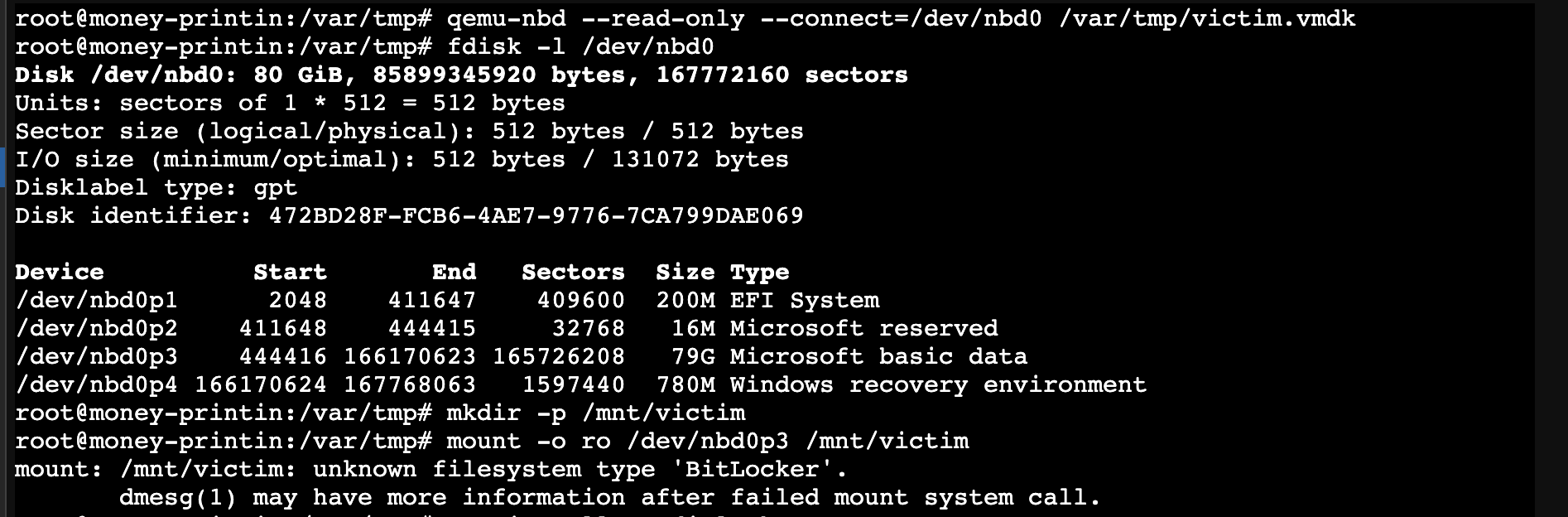
Since VMDK is a disk image, not a memory snapshot, the RAM that existed at the moment of the incident is gone. But the disk likely contains memory artifacts written to it.
The problem is that we don’t have the BitLocker key, so hiberfil.sys, pagefile.sys, swapfile.sys, and MEMORY.DMP are inside the BitLocker-encrypted partition, meaning there is no way to read them without booting the system.
Memory was collected live using Velociraptor’s built-in Windows.Memory.Acquisition artifact, which internally uses WinPmem to dump RAM:
.\velociraptor.exe artifacts collect Windows.Memory.Acquisition --output Z:\memory.zip -vThis produced a 2.2 GB memory image.
Bypassing the Windows Login Screen
The victim machine had no known credentials. The approach used is a well-known technique in forensics and incident response: replacing the Accessibility tool (Utilman.exe) with a copy of cmd.exe.
We forced Windows into its Recovery Environment by holding Shift and clicking Restart from the login screen, then navigated to:
Troubleshoot -> Advanced Options -> Command Prompt
From the recovery shell:
C:
cd Windows\System32
copy Utilman.exe Utilman.exe.bak
copy cmd.exe Utilman.exe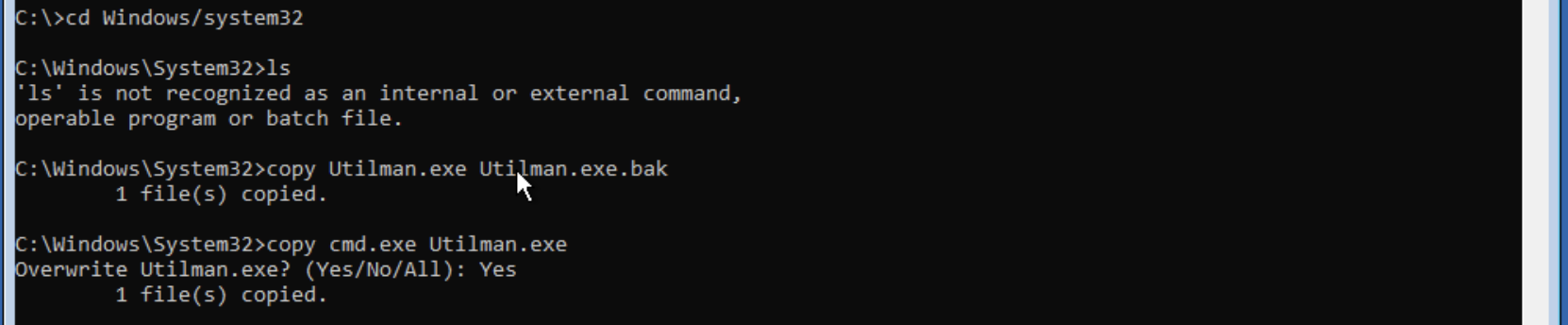
After rebooting, clicking the accessibility icon at the login screen spawned a CMD prompt running as SYSTEM. We then reset the victim user’s password and connected to his session:
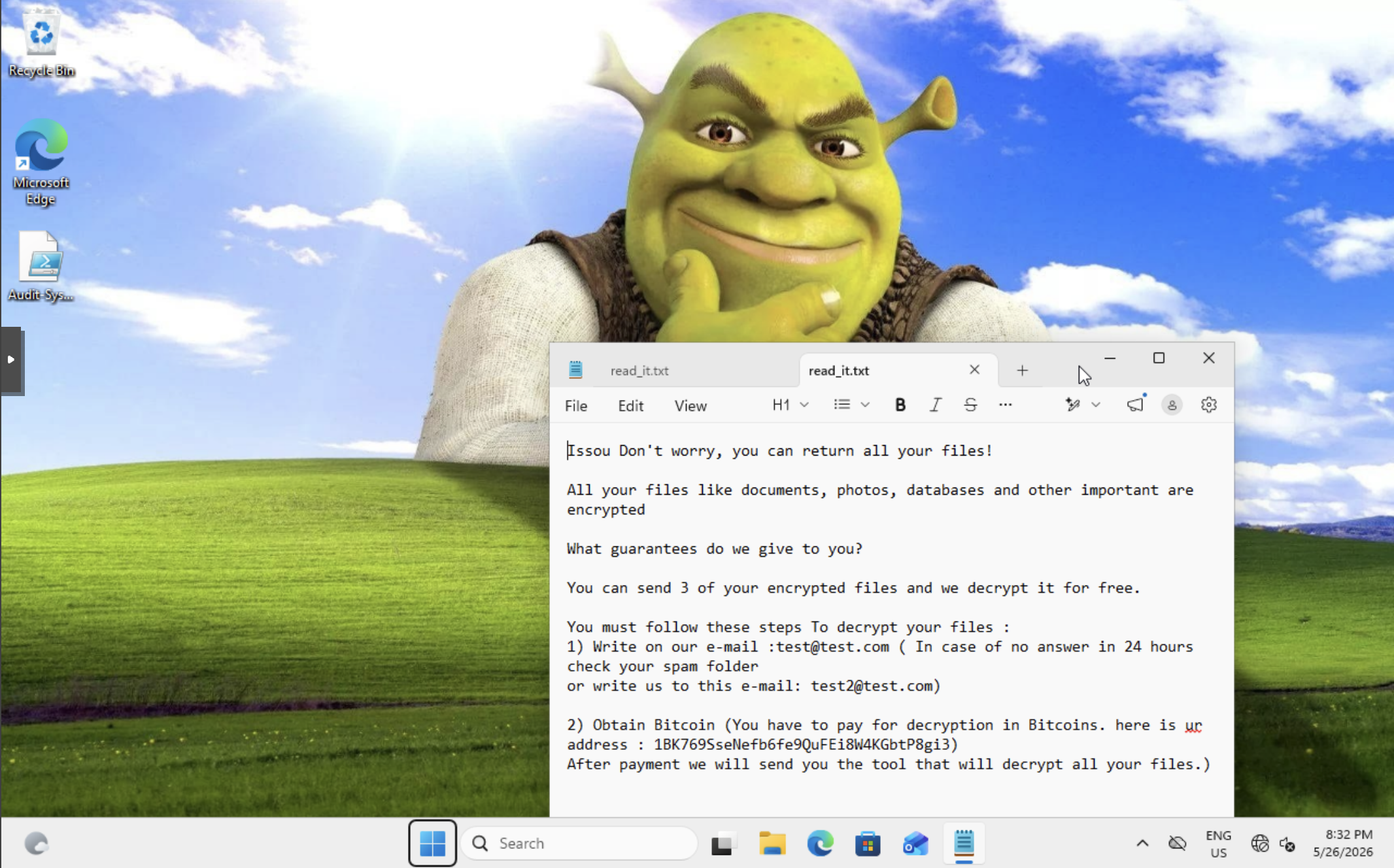
net user "Walter White" Password123!We are greeted with a ransom note and a Shrek wallpaper.
Artifact Collection
With access to the victim session, we proceeded with the collection phase. The goal was to minimize impact on the system: no unnecessary installs and no internet exposure.
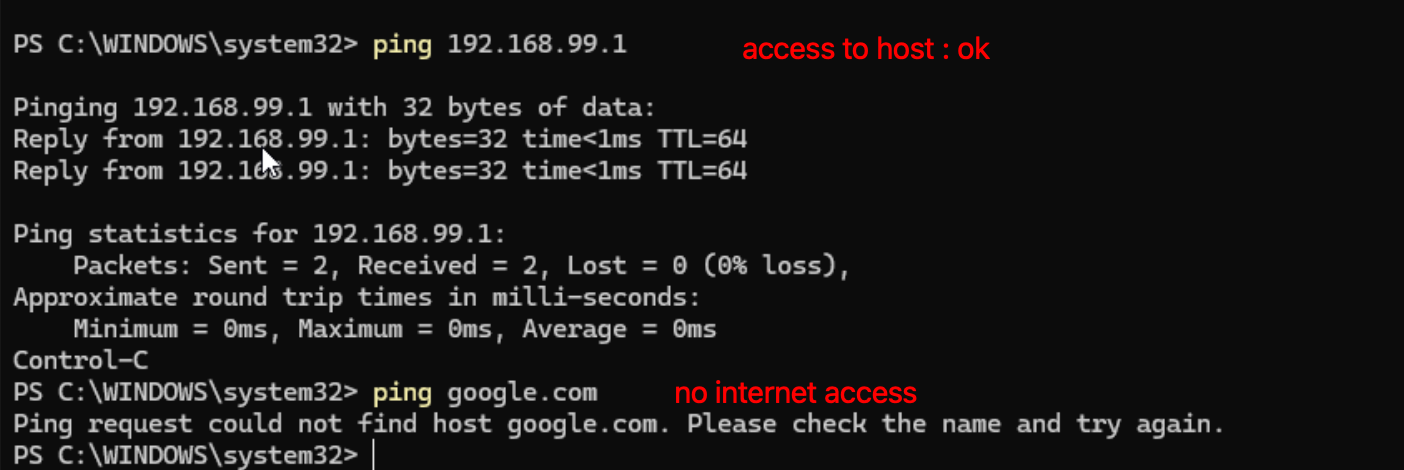
On the Proxmox host, we set up a Samba share to serve tools and receive output:
mkdir -p /srv/forensics
# smb.conf configured with authenticated user
systemctl restart smbd
From the victim VM, we mapped the share using an authenticated Samba user:
net use Z: \\192.168.99.1\forensics /user:forensic <smb-password>We then launched Velociraptor targeting the Windows.Triage.Targets artifact, writing output directly to the Proxmox share:
.\velociraptor.exe --definitions Z:\Windows.Triage.Targets.zip `
  artifacts collect Windows.Triage.Targets `
  --args HighLevelTargets=_SANS_Triage `
  --args CollectionPolicy=AllFiles `
  --output Z:\full_inc_collection.zip -v
Why Windows.Triage.Targets and not Windows.KapeFiles.Targets?
Windows.KapeFiles.Targets was the historical standard but is no longer bundled in Velociraptor 0.76.x. Windows.Triage.Targets is its actively maintained successor, hosted at triage.velocidex.com. Beyond replacing KAPE targets, it extends coverage with adaptive VQL-based rules that go beyond static glob patterns, collecting live process binaries via pslist, network connections, scheduled task executables, and prefetch-linked binaries at collection time. With CollectionPolicy=AllFiles and the _SANS_Triage meta-target, it covers the full forensic surface: event logs, registry hives, prefetch files, LNK files, SRUM database, browser history, and more.
This produced a 436 MB artifact collection.
Collection Summary
| Artifact | File | Size |
|---|---|---|
| Disk artifacts | full_inc_collection.zip | 436 MB |
| Memory dump | memory_collection.zip | 2.2 GB |
Both files were SHA256-hashed on the Proxmox host immediately after collection to preserve chain of custody.
sha256sum full_inc_collection.zip memory_collection.zip
b89d56d2c305ec67a0e0a44c65159ae99e39ea7bf44a10997624243923fe7f3d  full_inc_collection.zip
a53819564d049271daf107966aac979aa638538a5c7a8d02bba306f8b5dd1949  memory_collection.zip
Hayabusa Triage
Hayabusa is an open-source Windows event log threat hunting tool by Yamato Security. It runs Sigma detection rules against raw .evtx files and outputs a single consolidated timeline with severity-rated alerts, making it ideal for getting a quick triage overview without manually digging through each log channel.
We ran it against the full event log directory from the Velociraptor collection, loading all alert rules including Sysmon rules (4,523 rules total).
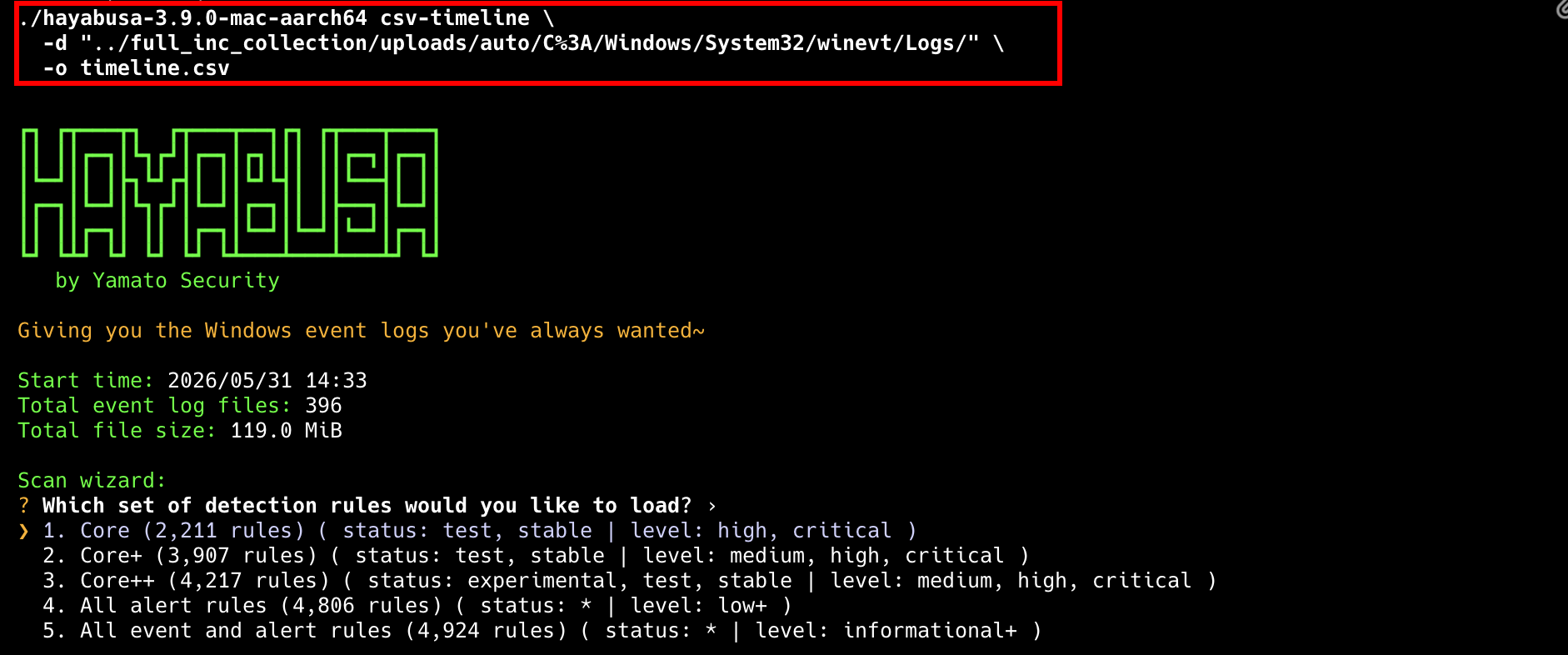
Out of 41,836 total events, 956 triggered detections, all concentrated on May 6th 2026 — confirming that’s our day of interest.
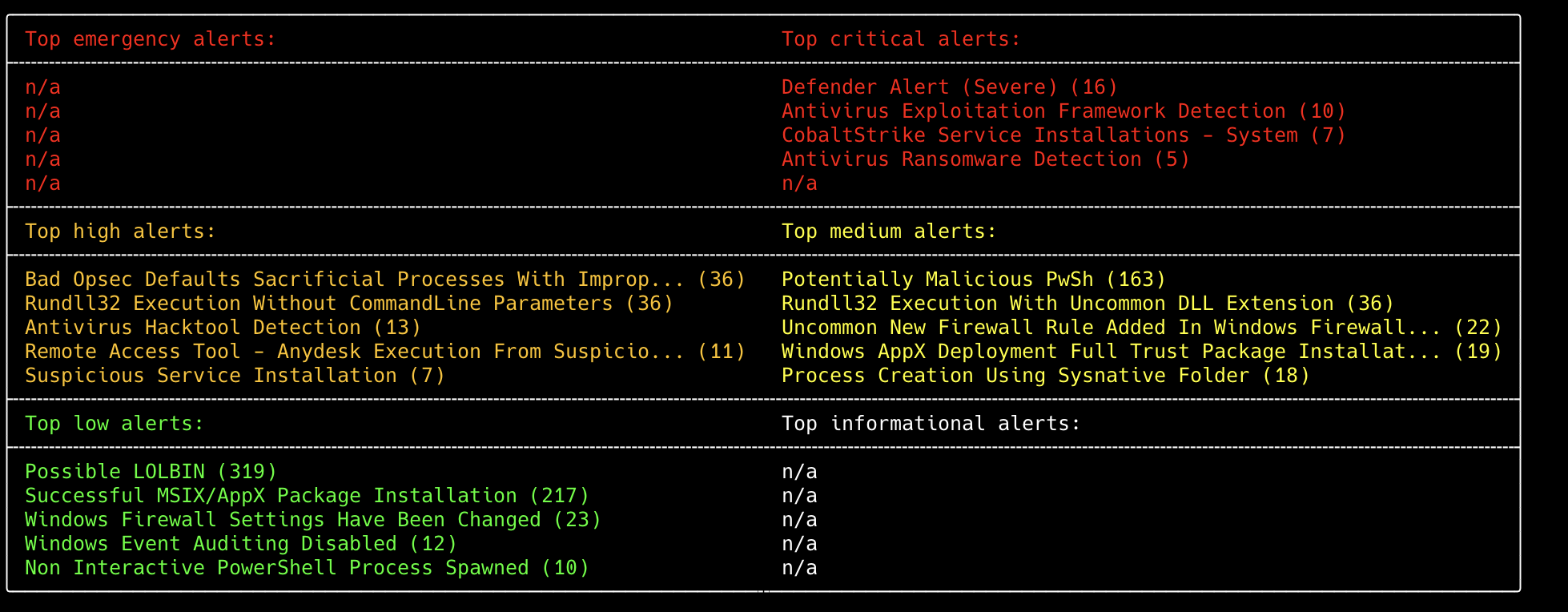
Even at this early stage, the kill chain is already taking shape from the alert summary alone. We can see AnyDesk being executed from a suspicious location, followed by what looks like a CobaltStrike deployment, suggesting the attacker used the remote access tool as an initial foothold before dropping a C2 framework. This is accompanied by heavy PowerShell activity, defense evasion attempts (Defender alerts, audit log tampering, firewall changes), and finally ransomware execution.
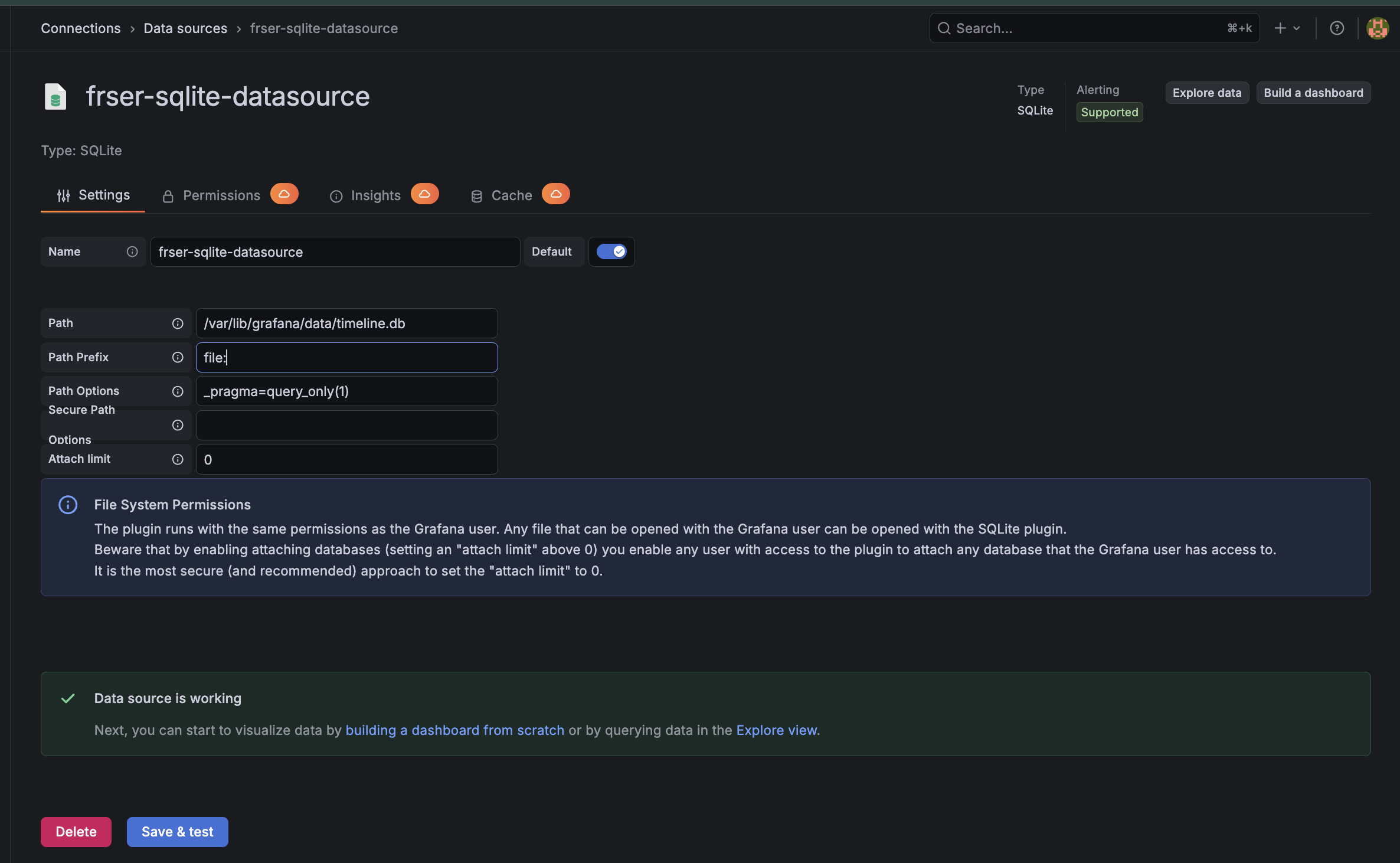
To navigate the detections more efficiently, we loaded the output into Grafana via a SQLite datasource, converted the CSV to a .db file, launched Grafana with Docker, and finally connected the datasource plugin.
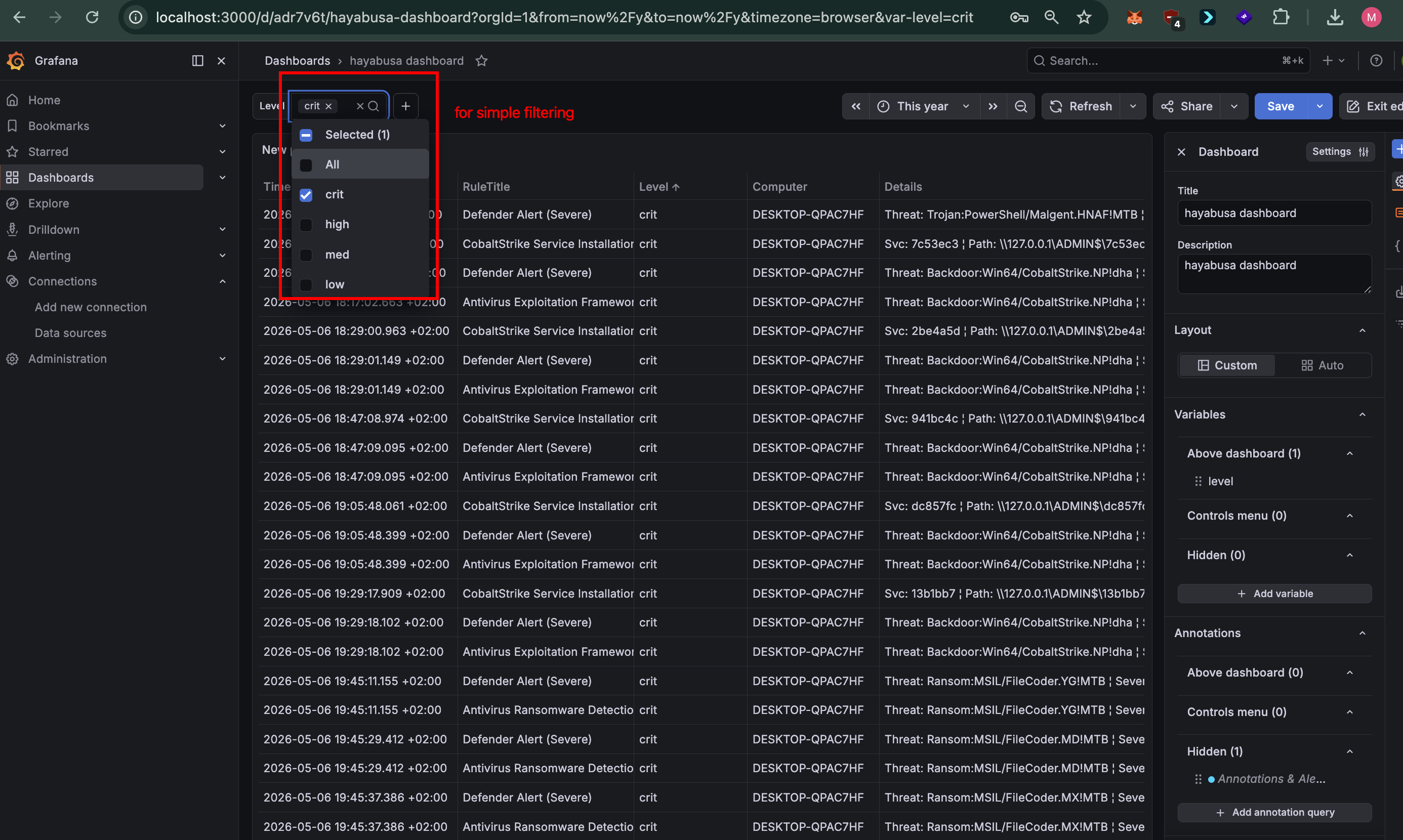
With this dashboard set up, the goal is to reconstruct the timeline of the attack. To keep things readable we filtered the detections by severity and laid them out on three parallel lanes: critical, high, and medium, all on May 6th.
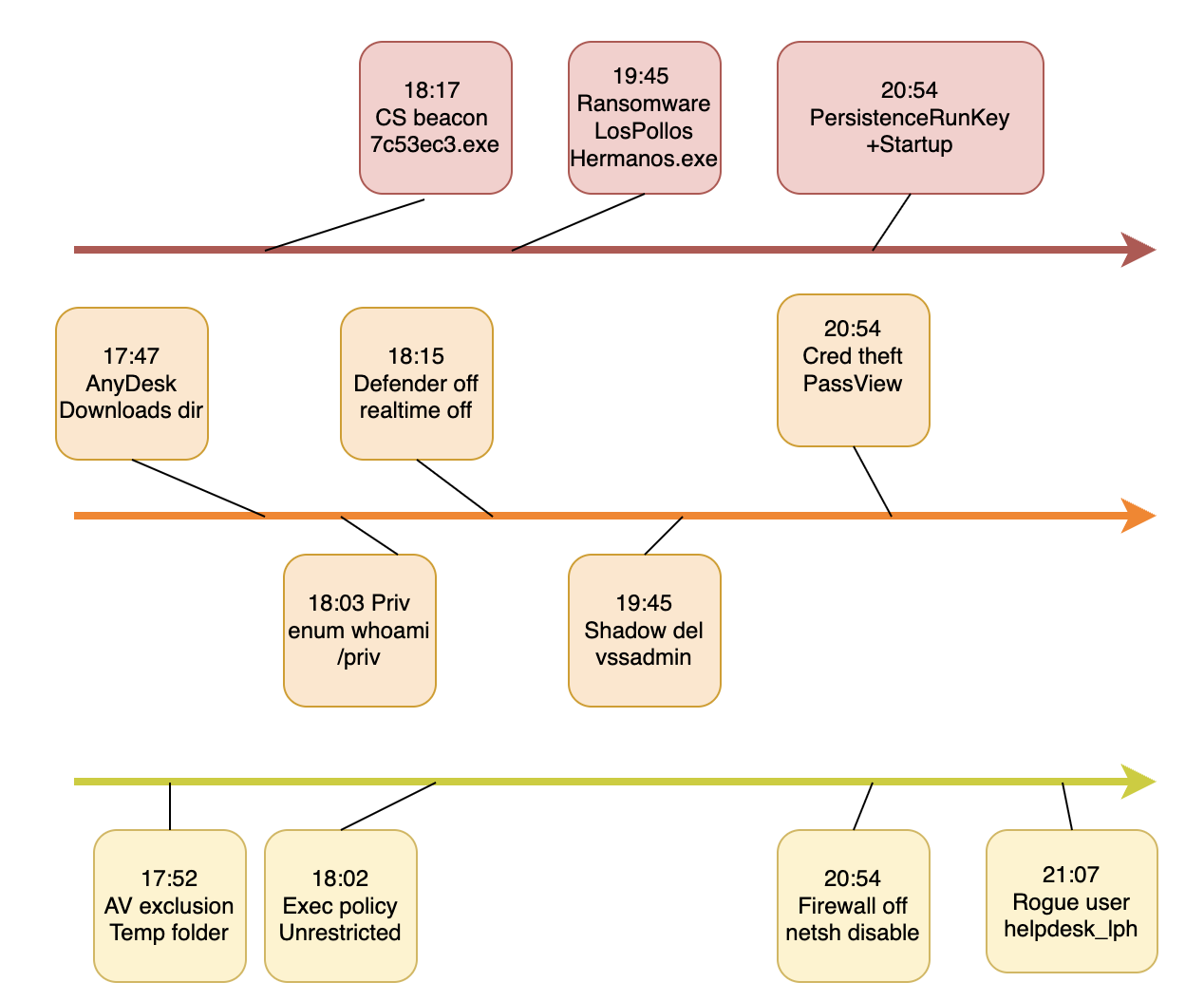
The full story unfolds across the three lanes. It starts on the high lane at 17:47 with AnyDesk being launched from the user’s Downloads folder, which lines up perfectly with the fake IT support phone call from the context. From there the attacker gets to work: a Defender exclusion is added on the Temp folder at 17:52, the PowerShell execution policy is set to Unrestricted at 18:02, and at 18:03 they run whoami /priv to check their privileges. At 18:15 Windows Defender’s real-time protection is disabled, and right on cue the first CobaltStrike beacon (7c53ec3.exe) fires on the critical lane at 18:17, dropped through the ADMIN$ share as a service.
The attack then moves into its destructive phase at 19:45, where the ransomware first executes as LosPollosHermanos.exe from the Desktop, dropping its payload svchost.exe into AppData\Roaming eighteen seconds later. At the same time on the high lane we see shadow copies being wiped with vssadmin and the boot configuration tampered with via bcdedit, classic anti-recovery moves to make sure the victim can’t roll back. At 20:36 an Empire PowerShell launcher shows up, telling us a second post-exploitation framework was in play alongside CobaltStrike.
Finally, everything converges around 20:54. On the critical lane the persistence is established (a RunKey pointing to svchost.exe plus a Helpdesk.exe beacon in the Startup folder), while on the high lane a BrowserPassview credential stealer dumps saved browser passwords, and on the medium lane the firewall is fully disabled via netsh. The last piece lands at 21:07 with the creation of a rogue local account helpdesk_lph.
UserAssist
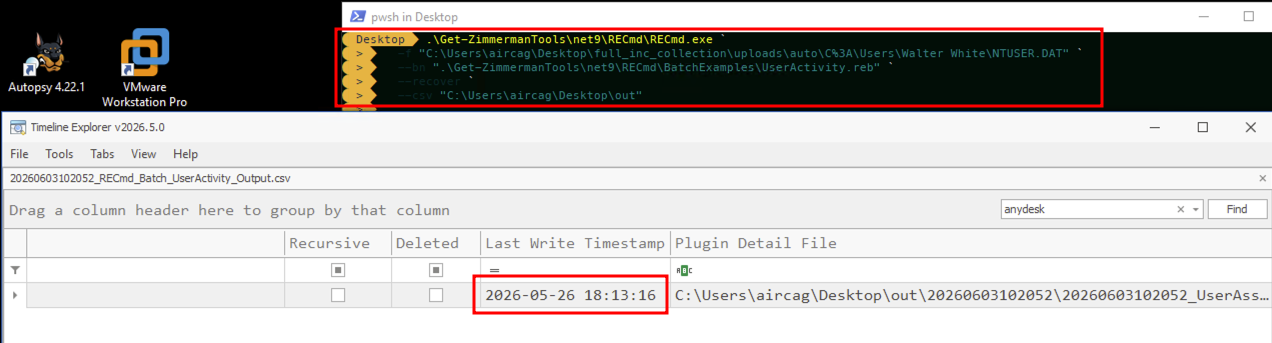
UserAssist records programs launched through the Windows Explorer GUI under the user’s NTUSER.DAT (ROT13-encoded). We parsed it with RECmd’s UserAssist plugin and confirmed an entry for C:\Users\Walter White\Downloads\AnyDesk.exe.
The presence of AnyDesk in UserAssist places it in the user’s interactive launch history from the Downloads folder.
Prefetch Analysis
Prefetch files are a Windows performance optimization mechanism introduced in XP. Every time an executable runs, the OS creates or updates a .pf file in C:\Windows\Prefetch, storing the binary name, full path hash, run count, and the last eight execution timestamps. Prefetch gives us proof of execution with precise timestamps, independent of event logs which can be cleared. We parsed the prefetch directory using PECmd and reconstructed the execution timeline below.
| Time (local) | Binary | Runs | Notes |
|---|---|---|---|
| 17:11–17:18 | MMC.EXE, IPCONFIG.EXE, PING.EXE | 1–7 | Reconnaissance hôte/réseau (probably: consoles MMC type services.msc/eventvwr, ipconfig + ping pour découverte connectivité) |
| 17:20:15 | TASKKILL.EXE | 1 | Terminaison de processus (probably: kill de processus AV/sécurité) |
| 17:30:18 | MPCMDRUN.EXE | 10 | Defender CLI, désactivation RTP / ajout d’exclusions |
| 17:48:00 | ANYDESK.EXE | 11 | Initial access, outil de remote access déposé via le faux appel support IT |
| 18:03:48 | WHOAMI.EXE | 3 | Discovery de privilèges, whoami /priv |
| 18:05:17 | REG.EXE | 2 | Modification de registre (probably: exclusion Defender ou clé Run de persistance) |
| 18:15:50 | POWERSHELL.EXE | 3 | PowerShell (probably: download cradle / changement d’execution policy) |
| 18:17:02 | 7C53EC3.EXE | 1 | Beacon Cobalt Strike (premier), déposé via partage ADMIN$ en service |
| 18:17:03 | RUNDLL32.EXE | 7 | Proxy execution (probably: post-ex Cobalt Strike / chargement de DLL) |
| 18:29:01 | 2BE4A5D.EXE | 1 | Payload Cobalt Strike (probably: beacon/job, même famille de nommage hex que 7c53ec3) |
| 18:47:08 | RUNDLL32.EXE | 5 | Proxy execution (probably: post-ex Cobalt Strike) |
| 18:47:09 | 941BC4C.EXE | 1 | Payload Cobalt Strike (probably: beacon/job spawné) |
| 18:51:56 | UPDATEAGENT.EXE (Windows\Temp) | 6 | Binaire masqueradé dans Windows\Temp (probably: loader/persistance, pas le vrai UpdateAgent Windows) |
| 18:53:54 | REGEDIT.EXE | 1 | Édition manuelle de registre (probably: persistance ou tampering de config) |
| 18:57:46 | TASKMGR.EXE | 3 | Task Manager (probably: attaquant inspecte/kill des processus) |
| 19:05:31–32 | ASPNET_REGIIS.EXE ×2 | 1 | Outil ASP.NET IIS (probably: setup tooling .NET ou abus de LOLBin) |
| 19:05:48 | DC857FC.EXE | 1 | Payload Cobalt Strike (probably: beacon/job spawné) |
| 19:07:38 | POWERSHELL.EXE | 16 | Activité PowerShell intense (probably: framework Empire / cradles encodés) |
| 19:20:03–05 | DOTNET-SDK-8.0.420 ×3 | 1 | Installeur .NET SDK (probably: mise en place d’un runtime pour exécuter un loader/outil .NET) |
| 19:21:18 | DOTNET.EXE | 1 | Exécution runtime .NET (probably: lancement d’un outil/loader .NET) |
| 19:21:21 | GETMAC.EXE | 4 | Reconnaissance, énumération adaptateurs/MAC |
| 19:29:18 | 13B1BB7.EXE | 1 | Payload Cobalt Strike (probably: beacon/job spawné) |
| 19:45:11 | LOSPOLLOSHERMANOS.EXE | 2 | Exécution du ransomware depuis le Desktop |
| 19:45:37 | BCDEDIT.EXE | 5 | Anti-recovery, tampering de la config de boot (désactivation recovery) |
| 19:45:37 | VSSADMIN.EXE | 2 | Anti-recovery, suppression des Volume Shadow Copies |
| 19:45:38 | WBADMIN.EXE | 3 | Anti-recovery (probably: suppression du catalogue/backups Windows) |
| 19:45:38 | WBENGINE.EXE | 3 | Moteur de backup block-level (probably: déclenché par wbadmin lors de la suppression des sauvegardes) |
| 19:46:51 | MMC.EXE | 3 | Console de management (probably: inspection services/journaux d’événements) |
| 20:18:36 | MMC.EXE | 2 | Console de management (probably: inspection services/journaux d’événements) |
| 20:22:22 | SVCHOST.EXE (pf=DLLHOST-7D5CE0CA) | 21 | Persistance du payload ransomware, svchost.exe exécuté depuis un chemin non-standard (AppData\Roaming) |
| 20:28:13 | 3C720E8.EXE | 1 | Payload Cobalt Strike (probably: beacon/job spawné) |
| 20:29:17 | 35FF52C.EXE | 1 | Payload Cobalt Strike (probably: beacon/job spawné) |
| 20:35:03 | WINDOWSUPDATE.EXE | 2 | Binaire masqueradé « WindowsUpdate.exe » n’est pas un nom Windows légitime (probably: loader/beacon) |
| 20:51:40 | RUNDLL32.EXE | 5 | Proxy execution (probably: post-ex Cobalt Strike) |
| 20:58:45 | NETSH.EXE | 6 | Désactivation du firewall via netsh |
| 21:03:29 | HELPDESK.EXE | 3 | Beacon de persistance dans le dossier Startup (Cobalt Strike) |
| 21:03:33 | CMD.EXE | 22 | Shell de commande (probably: commandes hands-on-keyboard de l’attaquant) |
| 21:07:55 | NET.EXE / NET1.EXE | 5 / 2 | Création du compte local rogue helpdesk_lph |
Several observations are worth highlighting. The CobaltStrike beacons all follow the same short hex naming pattern (7c53ec3, 2be4a5d, 941bc4c, etc.) and each shows a run count of 1, consistent with spawned jobs that execute and exit. ANYDESK.EXE shows 11 runs, meaning the attacker used the remote access session extensively throughout the intrusion. The rogue svchost.exe in AppData\Roaming stands out with 21 runs. Finally, the tight 27-second window between LOSPOLLOSHERMANOS.EXE, BCDEDIT.EXE, VSSADMIN.EXE, and WBADMIN.EXE at 19:45 confirms these were scripted anti-recovery commands launched automatically by the ransomware, not manual operator input.
Amcache Analysis
The Amcache hive (Amcache.hve) records metadata about executables that have been present on the system: path, SHA1 hash, and PE header attributes, independently of whether the binary still exists on disk at collection time. Unlike prefetch, it does not record execution counts or precise run times, but it provides cryptographic hashes that can be used directly as IOCs.
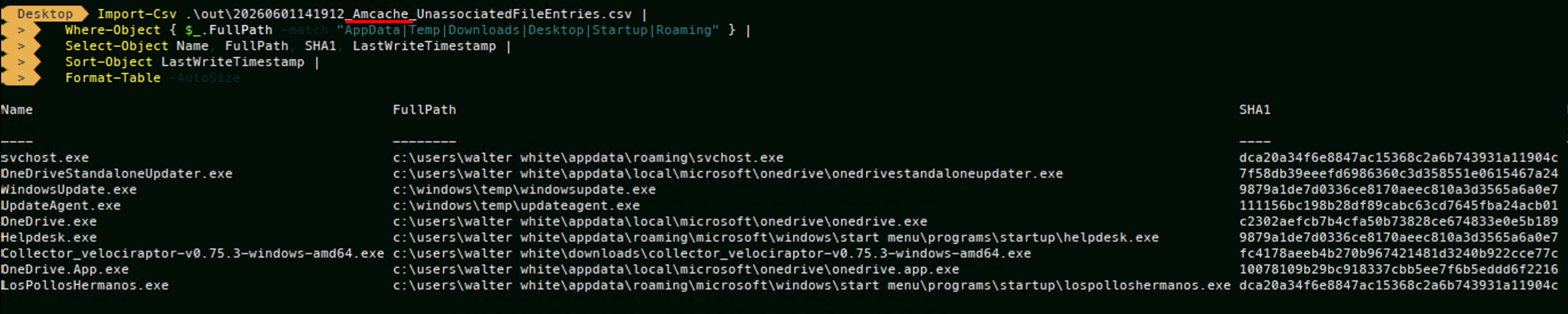
We parsed the hive using AmcacheParser and focused on UnassociatedFileEntries, which contains standalone executables not tied to an installed package, exactly where attacker-dropped binaries end up.
| Binary | Path | SHA1 | VirusTotal |
|---|---|---|---|
svchost.exe | AppData\Roaming\svchost.exe | dca20a34f6e8847ac15368c2a6b743931a11904c | VT |
LosPollosHermanos.exe | Startup\lospolloshermanos.exe | dca20a34f6e8847ac15368c2a6b743931a11904c | VT |
Helpdesk.exe | Startup\helpdesk.exe | 9879a1de7d0336ce8170aeec810a3d3565a6a0e7 | VT |
WindowsUpdate.exe | Windows\Temp\windowsupdate.exe | 9879a1de7d0336ce8170aeec810a3d3565a6a0e7 | VT |
UpdateAgent.exe | Windows\Temp\updateagent.exe | 111156bc198b28df89cabc63cd7645fba24acb01 | VT |
OneDrive.exe (legit) | AppData\Local\Microsoft\OneDrive\ | c2302aefcb7b4cfa50b73828ce674833e0e5b189 | VT |
OneDriveStandaloneUpdater.exe (legit) | AppData\Local\Microsoft\OneDrive\ | 7f58db39eeefd6986360c3d358551e0615467a24 | VT |
OneDrive.App.exe (legit) | AppData\Local\Microsoft\OneDrive\ | 10078109b29bc918337cbb5ee7f6b5eddd6f2216 | VT |
Two findings stand out immediately. First, svchost.exe in AppData\Roaming and LosPollosHermanos.exe in the Startup folder share the identical SHA1 dca20a34, confirming they are the same ransomware binary deployed under two names. Second, Helpdesk.exe and WindowsUpdate.exe share SHA1 9879a1de, identifying them as the same CobaltStrike beacon renamed for persistence.
PowerShell Analysis
The richest source for the hands-on-keyboard activity was the PowerShell Operational log (EID 4104, script block logging). Because PowerShell logs each layer of a script as it is deobfuscated at runtime, the attacker’s encoded payloads were captured in cleartext as they ran, giving us a near keystroke-level replay.
Defense evasion (17:49 – 18:12). The attacker lands and immediately profiles Windows Defender, then at 17:52 adds a Defender exclusion on C:\Windows\Temp, pre-clearing the folder where the beacons will later be dropped. They set the execution policy to Unrestricted, enumerate installed AV through both SecurityCenter2 and Defender, and disable UAC via the registry. A few clumsy cd typos in between confirm a live operator rather than an automated script.
17:49:54  Get-MpComputerStatus
17:52:10  Add-MpPreference -ExclusionPath "C:\Windows\Temp"
18:02:38  Set-ExecutionPolicy Unrestricted
18:05:03  Get-CimInstance -Namespace root/SecurityCenter2 -ClassName AntivirusProduct
18:04:58  Get-MpComputerStatus | Select IsTamperProtected,RealTimeProtectionEnabled | FL
18:05:17  cmd.exe /c "...reg.exe ADD HKLM\SOFTWARE\Microsoft\Windows\CurrentVersion\Policies\System /v EnableLUA /t REG_DWORD /d 0 /f"
Discovery (18:03 – 18:14). They run whoami /priv and a recon script named Audit-SystemInfo.ps1, dropped on the user’s Desktop. We recovered the original from C:\Users\Walter White\Desktop\Audit-SystemInfo.ps1 on the disk image, which confirmed exactly what it harvested.
It collects:
- User identity:
whoami, hostname,USERDOMAIN, user profile path, and whether the session is local console or remote/RDP - Domain membership: queries
Win32_ComputerSystemforPartOfDomain, pulls the domain name, and tries to locate a domain controller via the .NET DirectoryServices API - Permissions and groups: local admin check, UAC elevation state, local group membership, the full Windows token group list (resolving every SID, so domain groups show up too), and the process privileges from
whoami /priv - AV state: enumerates products through SecurityCenter2, decodes the
productStatehex to read real-time and definition status, then pulls Defender specifics viaGet-MpComputerStatus
Everything is written out to %LOCALAPPDATA%\Temp\result_<HOST>_<timestamp>.txt.
18:03:48  whoami /priv
18:03:23  .\Audit-SystemInfo.ps1
18:12:31  powershell.exe -NoProfile -ExecutionPolicy Bypass -EncodedCommand JAB0AHMAPQ...   # same audit script, base64-wrapped
18:13:21  Get-ADComputer -Filter * -Properties Name,OperatingSystem,IPv4Address
18:13:31  Get-ADComputer -Filter {OperatingSystem -like '*Windows 10*'}
18:14:09  Get-WMIObject win32_service -Property systemname, name, state, startname
Code execution / beaconing (18:15, 19:07, 19:27). Three times we see the same staged payload: a powershell -nop -w hidden -encodedcommand one-liner that decodes to a gzip IEX cradle, which decompresses into a PowerShell shellcode runner. Decoding the layers confirms the runner is the textbook CobaltStrike/Metasploit pattern: resolve VirtualAlloc, allocate RWX memory (0x3000 / 0x40), XOR-decode an embedded buffer with single-byte key 0x23, copy it in, and execute it through GetDelegateForFunctionPointer, wrapped in a -RunAs32 sacrificial job. XOR-decoding the embedded shellcode reveals a wininet HTTP reverse stager beaconing to 192.168.1.59 on port 80, with a hardcoded MSIE 10.0 User-Agent.
18:15:47  powershell -nop -w hidden -encodedcommand JABzAD0ATgBlAHcA...           # gzip IEX cradle
18:15:49  $s=New-Object IO.MemoryStream(,[Convert]::FromBase64String("H4sI..."))  # gunzip -> IEX
18:15:49  IEX (New-Object IO.StreamReader(New-Object IO.Compression.GzipStream($s,...))).ReadToEnd()
18:15:53  # inner runner: func_get_proc_address / VirtualAlloc / -bxor 35 / GetDelegateForFunctionPointer
          # re-run at 19:07:14 and 19:27:14
Persistence (18:41 – 21:07). The attacker navigates to the Startup folder to stage Helpdesk.exe, then installs a service pointing at the masqueraded beacon, and finally creates a rogue local account.
18:41:27  shell:startup
20:46:40  cd "C:\Users\Walter White\AppData\Roaming\Microsoft\Windows\Start Menu\Programs\Startup"
20:34:54  New-Service -Name "TestService" -BinaryPathName 'C:\WINDOWS\Temp\WindowsUpdate.exe'
21:07:55  net user helpdesk_lph P@ssw0rd! /add
Note: the 11/05/2026 entries (Collector_velociraptor and WMIC capability checks) are our own collection activity and are excluded from the attack timeline.
Extracted IOCs
| Type | Indicator |
|---|---|
| C2 server | 192.168.1.59:80 (HTTP) |
| Beacon User-Agent | Mozilla/5.0 (compatible; MSIE 10.0; Windows NT 6.1; WOW64; Trident/6.0) |
| Shellcode | wininet HTTP reverse stager, MSF/CS block_api, XOR key 0x23 |
| Recon script | Audit-SystemInfo.ps1 (SHA256 0E3822A40CB24EBB909637DE3A93B5689E5D0C16A7153D7A3FFB87EA958A27C1) |
| Recon loot | %LOCALAPPDATA%\Temp\result_<HOST>_<timestamp>.txt |
| Persistence (service) | TestService -> C:\Windows\Temp\WindowsUpdate.exe |
| Persistence (account) | helpdesk_lph / P@ssw0rd! |
| UAC disable | HKLM\...\Policies\System\EnableLUA = 0 |
MFT Timeline
Prefetch and Amcache told us what ran and gave us hashes, but they don’t tell us when each file first landed on disk. For that we parsed $MFT with MFTECmd and correlated the on-disk creation time of each attacker artifact against its first execution time from Prefetch. This ties the whole chain together from a fourth independent source and lets us measure the gap between a file being dropped and being run.
Drop vs Execution
| Binary | Path | Created (MFT) | First run (Prefetch) | Gap |
|---|---|---|---|---|
| AnyDesk.exe | Users\Walter White\Downloads | 17:47:45 | 17:48:00 | ~15s |
| UpdateAgent.exe | Windows\Temp | 18:48:01 | 18:51:56 | ~4 min |
| WindowsUpdate.exe | Windows\Temp | 18:18:31 | 20:35:03 | staged early, run later |
| Audit-SystemInfo.ps1 | Users\Walter White\Desktop | 19:01:00 | (run via console) | recon script |
| Helpdesk.exe | Startup | 19:01:13 | 21:03:29 | staged for persistence |
| svchost.exe | AppData\Roaming | 19:03:31 | (ran as svchost, 21 Prefetch runs) | ransomware payload |
The svchost.exe Masquerade
The MFT makes the svchost.exe masquerade obvious. The legitimate Windows copies live in System32, SysWOW64, and WinSxS, are 53–88 KB, and were created back in March 2026 with the OS install. The attacker’s copy sits in AppData\Roaming, is 769 KB, and was created at 19:03:31 on the day of the attack. Same filename, completely different size, location, and creation date, and the 769 KB size matches LosPollosHermanos.exe exactly, which lines up with the shared SHA1 we already found in Amcache. It is the ransomware wearing a system process name.
Deleted Artifacts Recovered from the MFT
Filtering for records where InUse=False (file deleted, MFT entry not yet overwritten) surfaced two artifacts the attacker tried to clean up:
| File | Path | Created | Notes |
|---|---|---|---|
connection_trace.txt | AppData\Roaming\AnyDesk | 17:49:09 | AnyDesk’s own incoming-connection log, deleted |
ConsoleHost_history.txt | PSReadLine | 17:49:54 | PowerShell command history, deleted |
dc857fc.exe | Windows | 17:05:48 | CobaltStrike beacon, deleted after use |
Both connection_trace.txt (AnyDesk’s record of who connected) and ConsoleHost_history.txt (the operator’s typed PowerShell history) were deleted, and crucially both were deleted at 17:45, right as the ransomware fired. The attacker wiped the two artifacts that would most directly expose the AnyDesk session origin and the hands-on-keyboard commands. The MFT entries survived the deletion, which is exactly why we can still see they existed.
Ransom Note Spread
read_it.txt (644 bytes) appears 170+ times across the MFT. The first wave was dropped between 17:45:38 and 17:45:41 on May 6th, blanketing user profile folders, AppData\Local\Packages, ProgramData, and even AppData\Roaming\AnyDesk. The note was dropped into essentially every directory the ransomware walked.
AnyDesk Artifact Analysis
AnyDesk keeps its logs and config under %APPDATA%\AnyDesk, and they survive even after the executable is removed. The runtime trace (ad.trace) is plaintext, while several supporting files (connection_trace.txt, file_transfer_trace.txt, and the *.cache files) are AES-encrypted blobs we could not read without the client key. Fortunately ad.trace alone carries the full picture.
The session began at 15:47:59 when AnyDesk.exe was launched from C:\Users\Walter White\Downloads, lining up exactly with our Prefetch (17:48 local) and MFT (creation 17:47:45) timestamps for the initial access, a third independent confirmation of the vishing-driven download.
The incoming connection is logged in full:
- Attacker AnyDesk ID:
157530657(fingerprint0b35dc1320c4) - Attacker public IP:
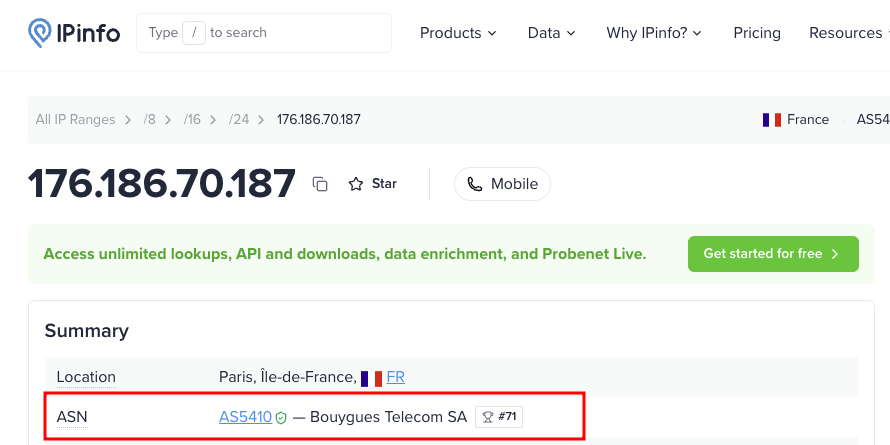
176.186.70.187:49175 - Victim AnyDesk ID:
1603161271(confirmed insystem.confasad.anynet.id) - Connection type: direct (peer-to-peer), Remote OS: Windows
The direct (rather than relay-proxied) connection is why the attacker’s real public IP was recorded. This is a network IOC entirely independent of the CobaltStrike C2 at 192.168.1.59, pointing at the operator’s own infrastructure.
The remote client advertised elevation capabilities (request_elevation, request_elevation_pw), consistent with the UAC-disable and privilege activity we saw shortly after in the PowerShell logs.
Two sessions were recorded on May 6th: the first at 15:48:50 and a reconnection at 16:08:16, with the session finally closed by the remote side at 16:48:53. During the first session, AnyDesk’s file-transfer feature was used: app.prepare_task entries show preparation staged in C:\Users\Walter White\AppData\Local\Temp, with one file transferred at 16:00. The small volume suggests tooling being pushed onto the host rather than bulk data exfiltration.
IOCs
| Type | Indicator |
|---|---|
| Attacker AnyDesk ID | 157530657 |
| Attacker public IP | 176.186.70.187:49175 |
| Attacker AnyDesk fingerprint | 0b35dc1320c4 |
| Victim AnyDesk ID | 1603161271 |
The IP resolves to Bouygues Telecom, a French ISP.
Bitcoin Address Analysis
The ransom note instructs the victim to pay to the Bitcoin address 1BK769SseNefb6fe9QuFEi8W4KGbtP8gi3. We enriched this indicator using public blockchain explorers and threat-intelligence labeling services.
Arkham Intelligence labels this address as Lazarus Group, tagged OFAC-Sanctioned, Suspicious, and Hacker (Arkham). The Lazarus Group attribution is corroborated by the FBI, which publicly named the group as responsible for the Harmony Horizon Bridge theft (FBI press release).
In a real incident, a sanctioned-entity wallet in a ransom demand would be a critical finding: paying it could constitute an OFAC sanctions violation regardless of the actual operator.
Conclusion
That’s everything for part 1. In the next part we will try to reverse both malware samples to get more IOCs and understand how they work.